


Hidden Privacy Risks Inside Your Smartphone Are Bigger Than You Think
Think about what your phone knows right now. It knows where you slept last night. It’s known who you called at 11 PM. It knows what you searched for before you told anyone. It knows your walking pace, your heart rate, and roughly how anxious you were yesterday.
The hidden privacy risks inside your smartphone are not some future threat. They are active right now, running in the background, collecting data across every app, sensor, and system service your phone quietly operates.
Most Americans have no idea how deep this goes. This article is a Privacy Lab investigation. We are not here to scare you. We are here to show you exactly what is happening and what you can actually do about it.
What Phone Makers and App Companies Promise You
Every major smartphone brand promises privacy.
- Apple built an entire marketing campaign around it. Their App Tracking Transparency feature lets you block apps from following you across the internet. They run television ads about privacy. They put it on billboards.
- Google offers a Safety Section in the Play Store and a Privacy Dashboard on Android. They say you are in control.
- Samsung promotes Knox security and privacy settings built into their Galaxy phones.
The message from all three is reassuring. Your data is yours. You have the controls. You are protected. That messaging is not entirely false. But it leaves out most of the picture.
The Reality: What Is Actually Happening on Your Phone
Sensors Running Without Your Knowledge
Your smartphone contains more sensors than most people realize. Most users think about the camera and microphone. Those are the obvious ones.
But modern phones also carry:
- Accelerometers that track movement and physical activity
- Gyroscopes that detect orientation and subtle motion
- Barometers that measure altitude and pressure changes
- Magnetometers used for compass functions
- Proximity sensors that track when your face is near the screen
- Ambient light sensors that adjust screen brightness
Here is the part that matters. Many of these sensors do not require explicit permission to access. Research from multiple universities, including a study cited by the Electronic Frontier Foundation, has shown that apps can use motion and orientation sensors to fingerprint your device and track your behavior without ever asking for location access. That is a real and documented privacy risk. No permission dialog ever warned you about it.
Background App Activity You Cannot See
Apps do not stop working when you close them. On both iOS and Android, many apps continue running background processes after you exit. They sync data, refresh content, log location updates, and send information to remote servers.
A 2020 study from researchers at Princeton University found that thousands of popular Android apps share data with advertising networks continuously, including when the app is not actively in use. This background activity is the engine behind targeted advertising. It is also one of the most significant hidden privacy risks inside your smartphone that most users never address.
The Hidden Privacy Risks Inside Your Smartphone: A Deeper Look
The Advertising ID Problem
Every Android and iPhone carries a unique advertising identifier. On iPhone, it is called the IDFA. On Android, it is the GAID. These identifiers let advertisers track your behavior across multiple apps and build a detailed profile of your interests, habits, and purchasing patterns.
Apple added App Tracking Transparency in 2021, which requires apps to ask permission before using your IDFA. That was a meaningful improvement. But research from Lockdown Privacy and other independent groups found that some apps continued tracking users through alternative methods even after users said no. The problem did not disappear. It got more creative.
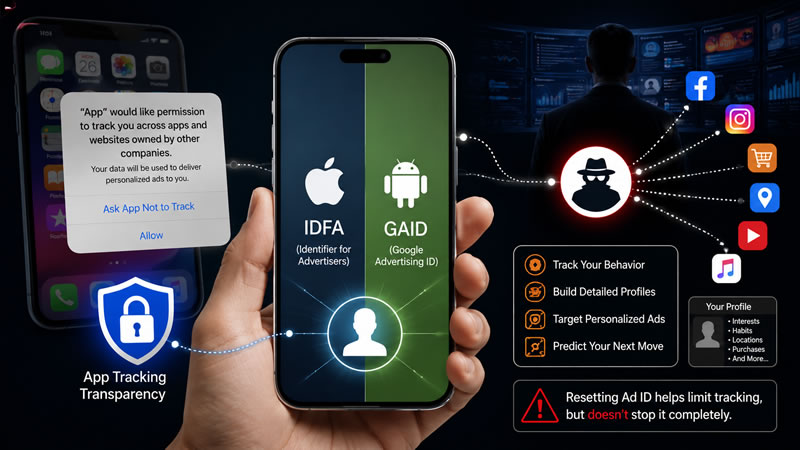
Google announced plans to phase out its advertising ID for apps targeting children and to give users more control. But the broader advertising ID system on Android remains active by default for most users. Resetting your advertising ID regularly limits how complete that profile can become. It does not eliminate tracking. It just breaks the continuity of the data trail.
Your Carrier Is Also Watching
Verizon, AT&T, and T-Mobile all collect data from your phone activity at the network level. This includes which apps you use, when you use them, your approximate location based on cell tower connections, and your browsing patterns if you use their data connection.
All three carriers offer opt-out options for their targeted advertising programs. These settings are buried in account management portals and are not presented upfront during setup. Verizon has faced FCC fines in the past for tracking users without clear consent. That is not ancient history. It directly shapes how you should think about carrier privacy today.
Pre-Installed Apps You Never Asked For
Many Android phones, particularly from Samsung and budget manufacturers, ship with pre-installed apps from third parties. These apps often run in the background by default. Some cannot be uninstalled. Some collect usage data and report back to the manufacturer or their advertising partners before you ever open them.
This practice is sometimes called bloatware. But framing it as inconvenient underplays the actual privacy concern. Pre-installed software with background network access is a data collection system you never consented to.
Privacy Risk Comparison by Platform
| Risk Factor | iPhone | Android (Google Pixel) | Android (Samsung) |
| Ad Tracking Default | Off by default after iOS 14.5 | Active by default | Active by default |
| Pre-installed Third-Party Apps | Minimal | Minimal | Significant |
| Sensor Permission Controls | Partial | Partial | Partial |
| Carrier Data Collection | Present on all carriers | Present on all carriers | Present on all carriers |
| Background App Data Sharing | Restricted by iOS | Less restricted | Less restricted |
| Government Data Request Compliance | Yes | Yes | Yes |
| On-Device AI Data Handling | Stronger privacy claims | Weaker privacy claims | Routes some data to Google |
Real World Impact: What This Data Is Used For
Targeted Advertising
The most immediate use of your smartphone data is advertising. The more detailed your profile, the more advertisers pay to reach you. That sounds abstract until you notice that a conversation you had near your phone shows up as an ad two hours later. That experience is reported by millions of users. Researchers debate the exact mechanism, but the result feels real because the data collection is real.
Insurance and Financial Profiling
This is a less-discussed but documented concern. Some insurers and financial services companies have begun exploring app data, location history, and behavioral patterns as factors in risk assessment. The Federal Trade Commission has raised concerns about data brokers selling personal profiles to financial institutions. Your smartphone data does not stay inside the advertising ecosystem. It flows outward into industries that directly affect your rates, credit, and access to services.
Law Enforcement Access
Apple and Google both publish transparency reports on government data requests. Both companies comply with valid legal requests. That means data stored on your phone or in their cloud systems can be accessed by law enforcement under the right legal conditions. Understanding that reality helps you make more informed choices about what you store and where.
Pros and Cons: The Honest Picture
What Modern Phones Get Right
- Apple’s App Tracking Transparency is a genuine and meaningful privacy improvement
- Both iOS and Android now offer Privacy Dashboards to review app permissions
- Encrypted messaging apps like Signal provide real communication privacy
- On-device processing for some tasks genuinely reduces cloud data exposure
- Users have more control today than they did five years ago
Where the Risks Remain Real
- Sensor access loopholes bypass standard permission systems
- Background app data sharing continues on most Android devices
- Pre-installed apps on many Android phones carry real privacy exposure
- Carrier-level tracking operates independently of phone settings
- Advertising IDs enable cross-app tracking even with some protections active
- Data broker ecosystems buy and resell your profile without your direct knowledge
Hidden Tradeoffs Most Users Miss
- Convenience features like location-based suggestions require ongoing location access
- Cloud backup services store sensitive data on company servers
- Smart assistants like Siri and Google Assistant log voice queries by default
- Health and fitness apps collect deeply personal biometric data with limited regulation
What You Can Actually Do Right Now
These steps make a real difference. None of them requires technical expertise.
1. Reset your advertising ID. On iPhone, go to Settings, Privacy, then Tracking. On Android, go to Settings, Google, then Ads.
2. Review app permissions every three months. Delete apps you do not use. Revoke location access for apps that do not need it to function.
3. Opt out of carrier advertising programs. Search your carrier’s name plus “advertising opt out” and follow their account portal instructions.
4. Turn off background app refresh for non-essential apps. On iPhone, this is under Settings, then General. On Android, find it under Battery settings.
5. Use a privacy-focused browser on mobile. Firefox and Brave both block many tracking scripts by default.
6. Consider a VPN on public networks. A reputable VPN encrypts your data traffic and prevents network-level snooping. Research providers carefully before trusting one.
Platform Privacy Comparison: Quick Reference
| Action | iPhone | Android |
| Reset Ad ID | Settings > Privacy > Tracking | Settings > Google > Ads |
| Review App Permissions | Settings > Privacy & Security | Settings > Apps > Permissions |
| Opt Out of Personalized Ads | Limit Ad Tracking toggle | Delete the Advertising ID option |
| Check Background App Activity | Settings > General > Background App Refresh | Settings > Battery > Background Usage |
| Review Location Access | Settings > Privacy > Location Services | Settings > Location > App Permissions |
Verdict
There is no perfect privacy phone on the market today. Every major platform collects some data. Every carrier tracks some behavior. The ecosystem of data brokers, advertisers, and third-party apps operates in ways that no single phone setting fully addresses.
That said, iPhone currently offers the strongest default privacy protections for mainstream consumers, particularly after iOS 14.5 and the introduction of App Tracking Transparency. Google Pixel phones offer a clean Android with fewer pre-installed apps and good privacy dashboard tools, though Google’s own data practices remain a legitimate concern.
Samsung Galaxy phones are the most exposed by default due to pre-installed apps, Samsung’s own data collection, and the routing of some Galaxy AI features through Google’s servers. The right move is not to switch phones. The right move is to spend thirty minutes this week adjusting your settings, reviewing your permissions, and opting out of the tracking systems you actually have control over.
That is free. It works. And it is more powerful than any privacy feature any phone company has ever marketed to you.
Final Thought
The hidden privacy risks inside your smartphone are not science fiction or paranoia. They are documented in research papers, confirmed by regulatory investigations, and embedded in the default settings of every major phone platform sold in America today. You do not have to accept all of it. You have real options.
The steps above take under an hour and deliver genuine protection. Understanding the hidden privacy risks inside your smartphone is the first step. Taking action is the one that actually protects you. Your phone is powerful. Make sure you are the one in control of it.